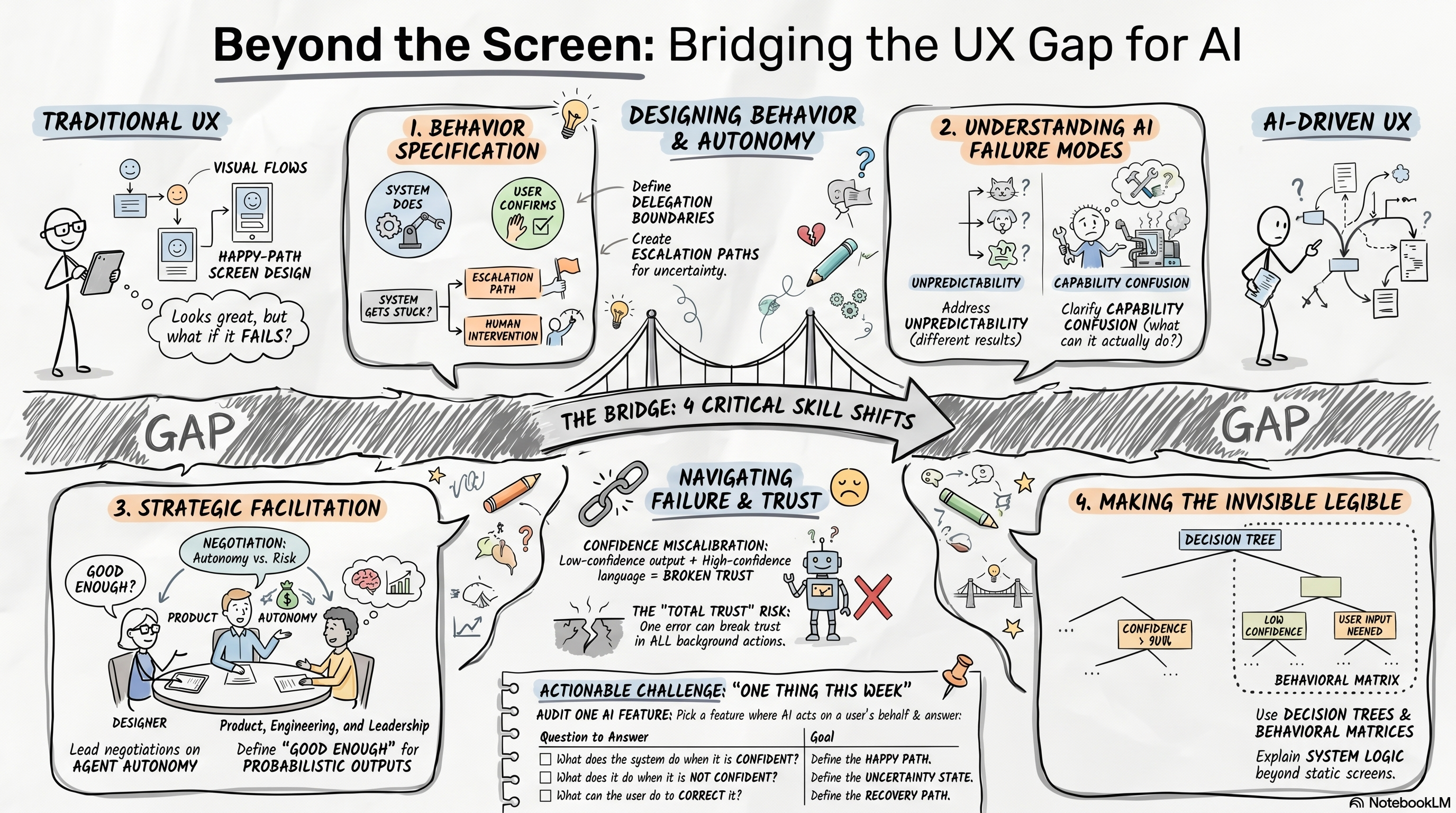
The Four Hidden Skills Designers Need for AI Products
A practical field guide to the four skills UX teams need to design trustworthy AI behavior.

Last month I watched a senior designer present a well-crafted flow for an AI-assisted feature. Clean Figma, solid thinking, reasonable interactions. Then someone in the room asked: "What does the system do when it is only sixty percent confident in the recommendation, and the user does not notice?"
No answer. Not because the designer had not thought hard enough. Because they had never been asked to think that way. The flow did not account for confidence states at all.
That is the gap, and it is more common than most people realize.
This is the first installment in an ongoing series on the skills and tools that matter now - from the perspective of someone navigating the same shift. Not a course catalog. A working document.
Four gaps keep showing up across UX practice right now. An honest account of what makes each one difficult, and one concrete thing you can do this week.
Behavior Specification
Most designers are trained to specify what screens look like and how users move through them. Very few are trained to specify what systems should do. These are different skills.
Behavior specification means defining delegation boundaries: what the system handles without asking, what requires user confirmation, and what requires full human review. It means designing escalation paths - the full motion from "the system got stuck" to "the user has control again." And it means specifying confidence states and what the interface communicates when the system is not sure.
None of that is in most design curricula. Most teams do not have a shared vocabulary for it yet. If you are working on any product where AI takes actions on a user behalf, this is the most urgent gap to close. That ambiguity is not a reason to wait - it is a reason to start building the vocabulary now, even imperfectly.
AI Failure Modes
Designers who do not understand how AI fails cannot design around those failures. Three modes matter most.
Unpredictability: the same prompt does not always return the same result, which means happy-path design is not enough. Recovery paths need as much attention as the primary flow. Capability confusion: users assume the system can do things it cannot, or misunderstand what it did - expectation-setting before the edge case is as important as the edge case itself. Confidence miscalibration: systems that present low-confidence outputs with high-confidence language, or the reverse, put designers in the position of deciding deliberately how uncertainty gets represented in the interface.
Each of these has real consequences for user trust. When trust breaks in an agentic product, it tends to be total: users do not just distrust the one wrong action. They distrust everything the system did quietly before that.
Facilitation
Facilitation sounds like a soft skill until you realize that the hardest design decisions in AI products are not design decisions - they are cross-functional negotiations about risk and autonomy.
When does the agent act without asking? What is the threshold for human review? What does "good enough" mean for a system producing probabilistic outputs? Who is responsible when it gets something wrong?
Those questions involve product, engineering, legal, and leadership. Somebody has to run that conversation. The designer with the clearest picture of user agency and lived experience is usually the right person. The skill is learnable - but it requires practice in actual rooms with actual stakes, not just workshop exercises.
Making Invisible Systems Legible
When system behavior cannot be shown in a screenshot, it has to be explained in other ways. Decision trees. Narrative walkthroughs. Behavioral matrices that describe what the system does at each confidence level, what users can correct, and what the recovery path looks like.
Stakeholders who have spent years reviewing Figma files now have to understand systems they cannot see. Designers who can build that narrative - clearly, without condescension - have a real advantage right now. The ones who cannot tend to find their influence bounded by what they can point to on a screen.
That is a real constraint on scope. It is also correctable.
One Thing This Week
Pick one feature in your current work where AI takes an action on a user behalf. Write down, in plain sentences, what the system does when it is confident, what it does when it is not, and what the user can do to correct it.
If you cannot answer all three, you have found the gap.
Start there. Everything else builds on it.